Pinterest is a massive “idea hub” where users can discover countless videos about cooking, DIY, beauty, fashion, travel, and more. Because of that, the demand for downloading Pinterest videos to watch offline or save for work has grown rapidly. However, downloading doesn’t always go smoothly. Many users encounter errors such as “cannot download”, “video unavailable”, or files that download without sound.
In this article, we’ll break down all the common reasons why you might not be able to download Pinterest videos, along with detailed solutions to help you fix every situation quickly and easily.
1. Invalid or incorrectly copied Pinterest link
This is the most common reason. Many users accidentally copy the wrong link, miss a few characters, or copy a shortened link that doesn’t contain the actual video data.
Signs:
-
No thumbnail appears when you paste the link into a downloader.
-
The tool shows “Invalid link” or “URL not supported”.
Causes:
-
Missing characters after “/pin/”.
-
Link copied from another app instead of directly from Pinterest.
-
Link leads to a profile page instead of a video page.
How to fix:
-
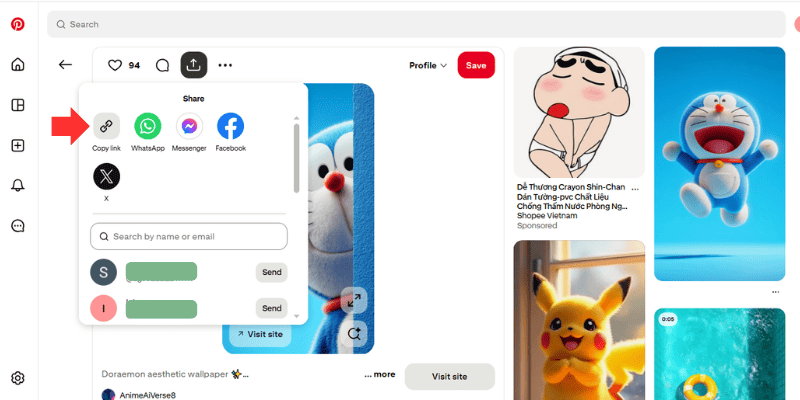
Open the video directly in the Pinterest app.
-
Tap the “•••” (or Share) button → Choose “Copy link”.
-
Avoid shortened links from third-party apps.
2. The Pinterest video has been deleted or no longer exists
Many videos get removed because the creator deleted them, changed content, or Pinterest detected a violation.
Signs:
-
Pinterest shows “Oops! Something went wrong” or a blank page.
-
The video doesn’t play even inside Pinterest.
Quick way to confirm:
-
Open the link in a different browser.
-
If the video won’t play, the content has been removed and cannot be downloaded.
No solution:
If the video no longer exists, no tool can download it because the source file is gone.
3. The video is private or has viewing restrictionsPinterest allows users to set boards to “Secret”. If the video is inside a secret board or has restricted viewing permissions, downloaders cannot access it.
Signs:
-
Tool displays “This content is private” or “Access denied”.
-
You can view it on your account, but the downloader cannot fetch it.
Causes:
-
The pin is visible only to the owner.
-
The video belongs to a Secret Board.
-
Sharing permission is disabled.
How to fix:
-
You cannot download private content.
-
Your only option is to ask the owner for the original video file (if they agree).
4. The video is region-restricted
Pinterest sometimes blocks content based on country/region due to copyright rules.
Signs:
-
You can watch the video, but others in different regions cannot.
-
Downloader shows “Video unavailable in your region”.
How to fix:
-
Use a VPN and switch to countries like the US, Canada, or Singapore.
-
Try downloading again in an incognito window with VPN enabled.
5. The creator disabled video sharing
Some creators disable the “Allow saving & sharing” option. Once this is turned off, downloaders cannot access the file.
Signs:
-
No “Save” or “Share” button.
-
Tool shows “Cannot fetch video file”.
How to fix:
-
The video can only be downloaded if the creator re-enables sharing.
6. Weak or unstable Internet connection
A poor network prevents the downloader from retrieving video data from Pinterest.
Signs:
-
Download stuck at 0%.
-
Tool shows “Failed to fetch video data”.
How to fix:
-
Switch to a stable WiFi connection.
-
Turn off the VPN if it slows down your network.
-
Clear your browser cache.
7. Pinterest changed its video data structure
Pinterest frequently updates its platform. When they change the video structure, download tools may temporarily fail.
Signs:
-
All Pinterest downloaders fail at the same time.
-
You try 3–4 tools but none of them work.
How to fix:
-
Wait for the downloader to update its system.
-
Use another platform or API if you need the video urgently.
8. The Pinterest downloader itself is malfunctioning
Sometimes the issue doesn’t come from Pinterest but from the downloader’s server or internal processing.
Signs:
-
The page loads slowly or doesn’t respond.
-
Generic “Download failed” messages.
-
It can download images but not videos.
How to fix:
-
Try a different downloader for comparison.
-
Clear your browser cache.
-
Wait 5–10 minutes and try again.
9. Browser or device is blocking the download request
Some devices (especially iPhones/iPads) block large file downloads or block new tabs required for downloading.
Signs:
-
File downloaded is empty.
-
You click “Download” but nothing happens.
How to fix:
-
On iPhone: use Safari (Chrome sometimes restricts downloads).
-
Enable “Download files” permission in your browser.
-
Update to the latest browser version.
Quick fixes when you cannot download Pinterest videos
If you want a fast solution, use this checklist - it solves 95% of cases:
-
Make sure the link is correct.
-
Check if the video still exists or has been deleted.
-
Ensure the content is not private.
-
Turn VPN on/off to test regional restrictions.
-
Try a different browser (Chrome, Safari, Firefox).
-
Clear browser cache and reload.
-
Try using another downloader.
-
Switch to a stronger WiFi network.
Following these steps usually resolves most download issues quickly.
Conclusion
Not being able to download Pinterest videos is very common. The issue may come from an invalid link, private content, region restrictions, browser errors, weak connection, or Pinterest updating its system. However, most problems are easy to fix once you understand the cause and follow the right troubleshooting steps.