Pinterest Image Downloader
By using this site, you agree to the Terms of Service
How to use Pinterest Image Downloader
Copy the image link
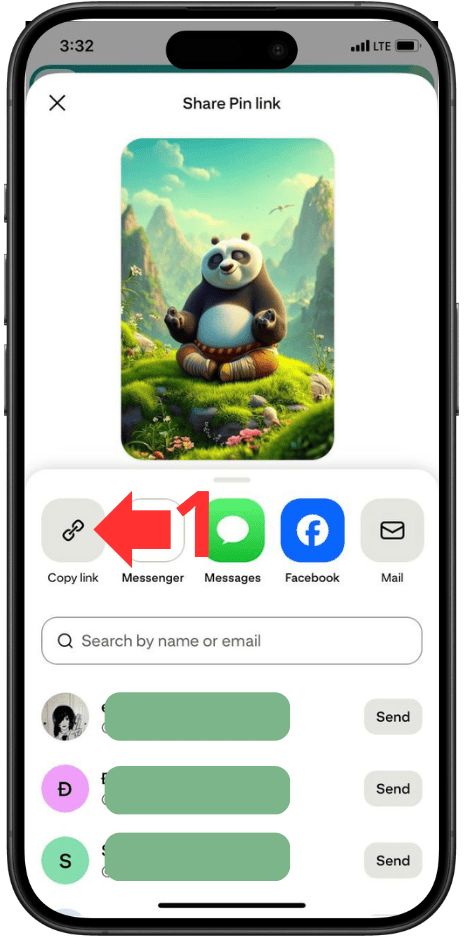
Paste the link
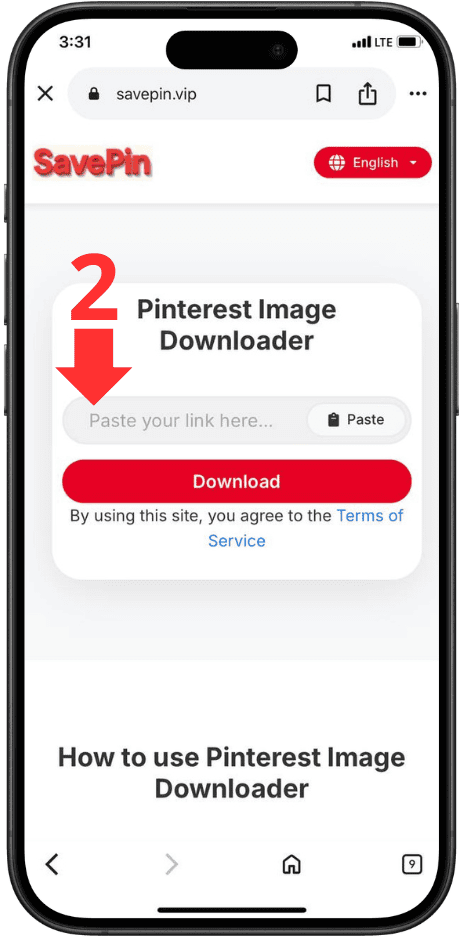
Click Download Now
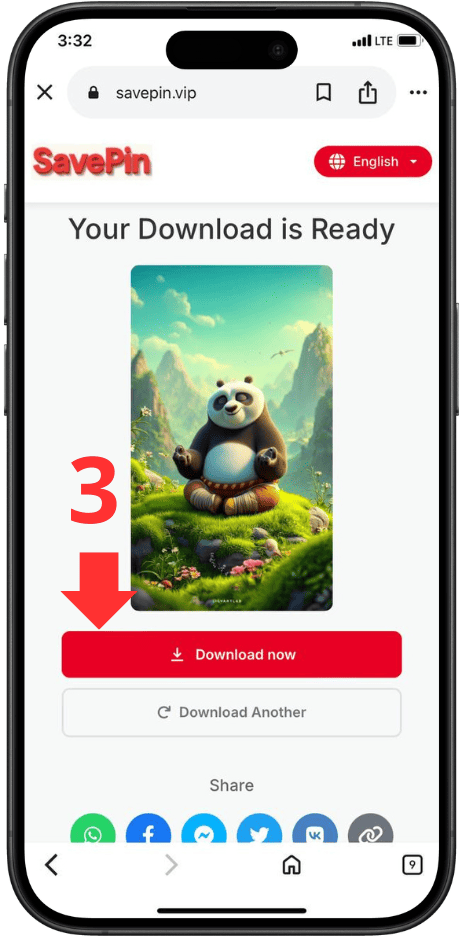
Pinterest Image Downloader is an online tool that allows you to download images from Pinterest in the highest quality - including HD, Full HD, 2K, and even 4K (if the original image supports it). This tool is designed for maximum speed, simple operation, and a one-click download experience.
No app needed, no account required, no annoying ads - just paste your Pinterest link and download instantly.
This Pinterest Image Downloader is perfect for:
-
Designers
-
Content creators
-
Marketers & advertisers
-
Bloggers & website owners
-
Students needing illustrations
-
Anyone who loves saving ideas, lifestyle images, décor, fashion, etc.
The tool runs entirely in your browser, ensuring high speed and full privacy.
1. How to Download Pinterest Images
Downloading images from Pinterest with this tool is extremely easy - even for elderly users or those unfamiliar with technology.
Method 1: Download Pinterest images on computer
Step 1: Copy the Pinterest image link
-
Open Pinterest in your browser
-
Click the image you want
-
Tap Copy Link or copy the URL in the address bar
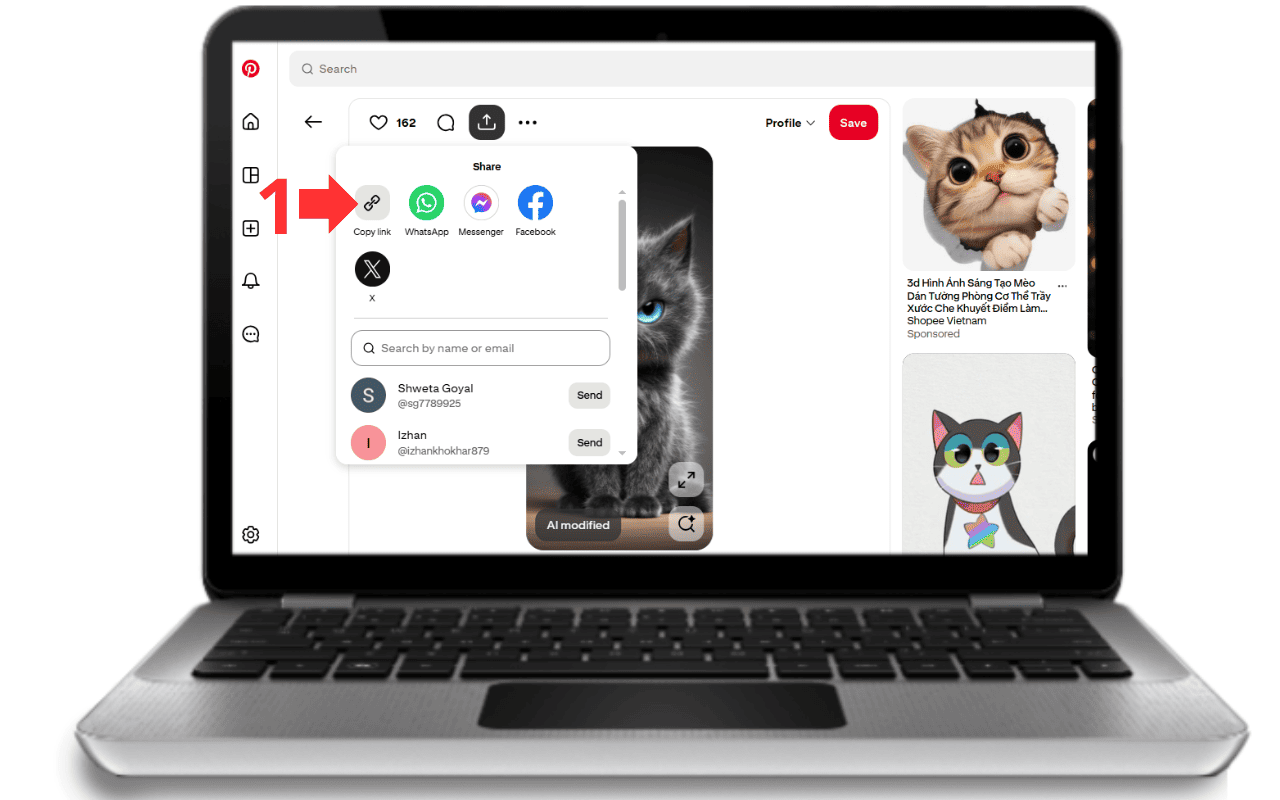
Step 2: Paste the link into the Pinterest Image Downloader
-
Open the tool
-
Paste the copied URL into the input field
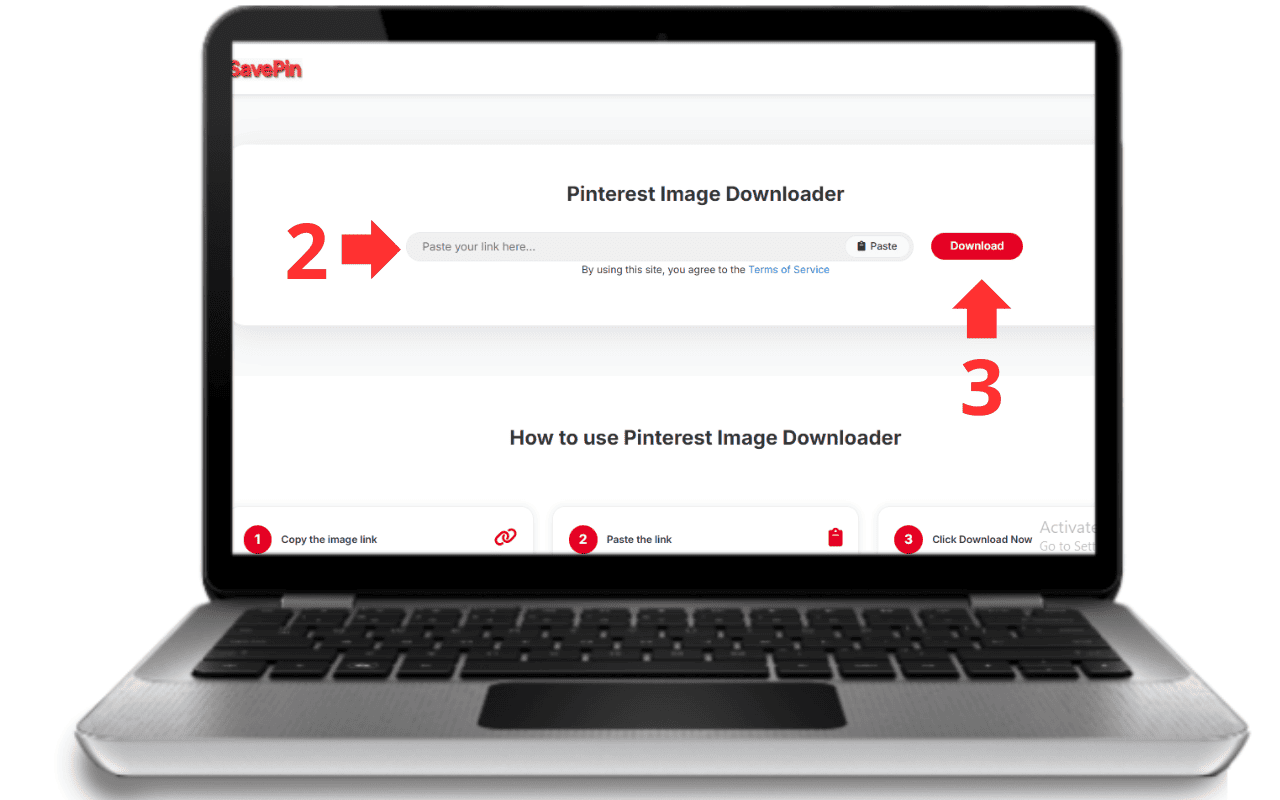
Step 3: Click “Download”
-
The system processes the link in seconds
-
When the image appears → click Download Image
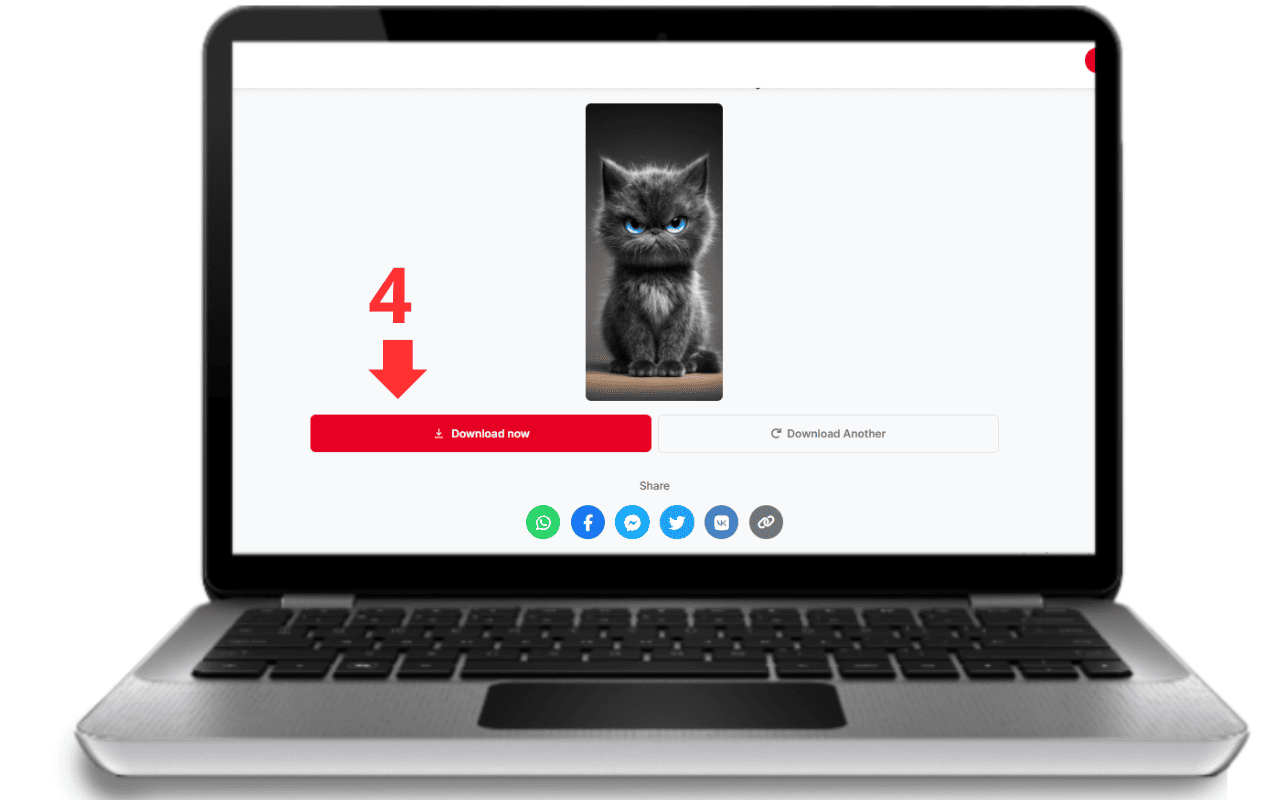
Step 4: Save the image
-
The image will be saved in HD or original quality depending on the source.
✔ Fast – simple – no installation needed.
Method 2: Download Pinterest images on mobile (Android & iPhone)
Step 1: Open the Pinterest App
Choose the image you want to save.
Step 2: Copy the link
Tap the ⋯ (Menu) → Copy link
Step 3: Paste into Pinterest Image Downloader
Open your browser (Chrome, Safari, etc.)
Paste the link into the tool.
Step 4: Download the image
Tap Download
The image will save directly to your Gallery / Downloads.
✔ No app required → saves storage space.
Tips to download high-quality images (HD – 4K)
-
Prefer original single-image Pins
-
Avoid Pins that are repeatedly re-pinned (quality may be compressed)
-
If Pinterest shows a small preview, open the image in a new tab for the best link
2. Highlight Features of the Pinterest Image Downloader
This tool is built with the philosophy of fast – simple – high quality – completely secure. Below are the standout features:
1. Download Pinterest images in highest quality (HD, Full HD, 2K, 4K)
-
No compression
-
No reduced resolution
-
No blurry details
Images remain exactly as they appear on Pinterest - crystal clear for design, presentation, or printing.
2. Ultra-fast processing speed
Optimized server architecture ensures:
-
Paste link → instant processing
-
Even if downloading hundreds of images in a row
3. No download limits
No:
-
daily limits
-
size limits
-
usage restrictions
Everything is 100% free.
4. No software or app installation
Works entirely in-browser on:
-
Chrome
-
Safari
-
Firefox
-
Edge
-
or any browser
No viruses, no storage required.
5. Works on all devices
Compatible with:
-
Android phones
-
iPhone / iPad
-
Windows laptops
-
MacBooks
-
Tablets
-
Smart devices with browsers
6. Simple, user-friendly interface
-
Large URL input box
-
Clear download button
-
No clutter, no unnecessary steps
7. No annoying ads
-
No pop-ups
-
No redirect ads
-
No banner spam
8. High security - No data collection
We guarantee:
-
No image storage
-
No URL logs
-
No user data collection
-
No tracking cookies
-
No account required
All processing happens directly in your browser.
9. Supports all Pinterest image types
-
Single images
-
Collection Pins
-
Idea Pin images
-
Infographics
-
Art & illustration
-
Large-size thumbnails
If the image has a link - it can be downloaded.
10. Compatible with all Pinterest versions
-
Pinterest Web
-
Mobile App
-
Pinterest Lite
-
Regional versions (US / EU / Asia)
11. Fast downloads even in heavy use
Optimized to:
-
Avoid lag
-
Handle mass downloads
-
Maintain stable speed
12. 100% Free – No hidden fees
-
No VIP plans
-
No paid tiers
-
No “upgrade to download HD” tricks
3. Benefits of Using Pinterest Image Downloader
For Designers – No wasted time searching
Quickly download high-quality visuals for inspiration or research.
For Marketers – Easy creative sourcing
Pinterest is full of creative concepts for ads, social media posts, and landing pages.
For Bloggers & Content Creators – Better visuals
Beautiful images increase engagement and reading time.
For everyday users – Save your favorite images with ease
Décor, fashion, recipes, room layouts, DIY ideas - all saved instantly.
Saves time – one simple action
Paste link → download
No login, no steps in between.
Bypass Pinterest’s restrictions
Pinterest often disables the download button - this tool solves that.
4. Is Pinterest Image Downloader safe?
Yes - absolutely safe.
The tool ensures:
-
No user data collection
-
No account needed
-
No saved images
-
No tracking cookies
-
No third-party sharing
Everything is processed in real time on your device.
5. Comparison with other Pinterest downloader tools
| Criteria | Our tool | Other tools |
|---|---|---|
| Speed | Very fast | Slow, ad-heavy |
| Image quality | Full HD – 4K | Often compressed |
| Ads | No ads | Many pop-ups |
| Limits | Unlimited | Daily limits |
| Security | No data storage | May store info |
| Device support | All devices | Often limited |
| Ease of use | Paste → download | Complicated |
Conclusion: Our tool is the most optimized for speed, simplicity, and privacy.
6. Does Pinterest allow image downloads? (Legal use)
Pinterest allows downloading in certain cases, but not all images can be used freely.
✔ Allowed:
-
Personal reference
-
Moodboards and idea collection
-
School or personal reports
✘ Not allowed without permission:
-
Commercial use
-
Republishing as your own
-
Editing and redistributing
-
Using in ads or product sales
Tip:
For commercial use, always request permission from the image owner.
7. Copyright Notice
Pinterest Image Downloader only helps download images - it does not own or control any content. Users must:
-
Take responsibility for image usage
-
Respect copyright rules
-
Avoid commercial usage without permission
8. Related Tools
These tools allow you to fully utilize Pinterest content easily and efficiently.
Conclusion
Pinterest Image Downloader is a fast, powerful, safe, and completely free tool suitable for everyone - from beginners to professionals.
Just copy → paste → download.
No ads, no login, no hassle.
Frequently Asked Questions
A tool that lets you download Pinterest images in original quality without registration.
Yes, 100% free with unlimited downloads.
Yes, just copy the Pin link - no login needed.
No limits at all.
Yes - HD, Full HD, and 4K if available.
You can download one image at a time. Bulk download is coming soon.
Yes - no data logs, no tracking, no storage.
Possible reasons:
-
Broken/invalid link
-
Private Pin
-
The Pin was removed
-
Regional restrictions
Yes - Android, iPhone, iPad, tablets, PCs.
Yes for personal use, but not for commercial purposes without permission.
Yes, but make sure you have the rights for commercial use.
No - images are downloaded without watermarks.
Yes, and more languages will be added.
Yes for personal, non-commercial usage.
Via the "Contact" page or support email on the website.