Pinterest GIFs Downloader
By using this site, you agree to the Terms of Service
How to use Pinterest GIFs Downloader
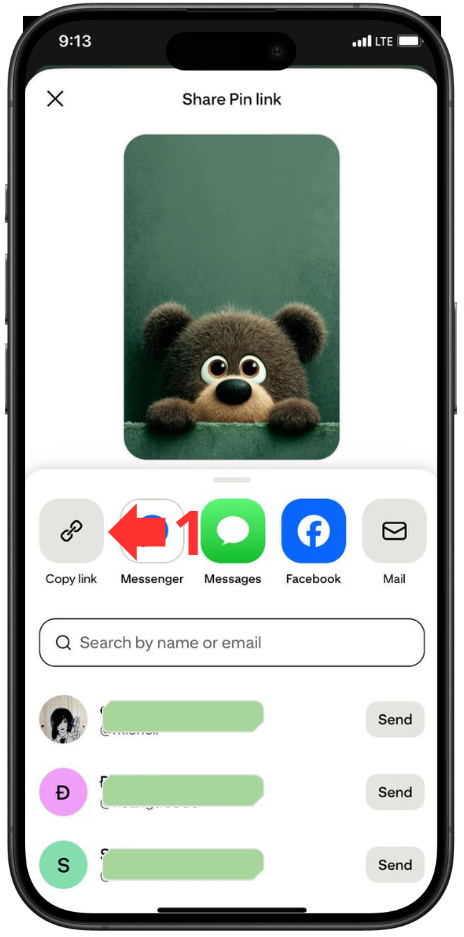
Copy GIF url
Go to Pinterest and copy the link of the GIF you want to download.
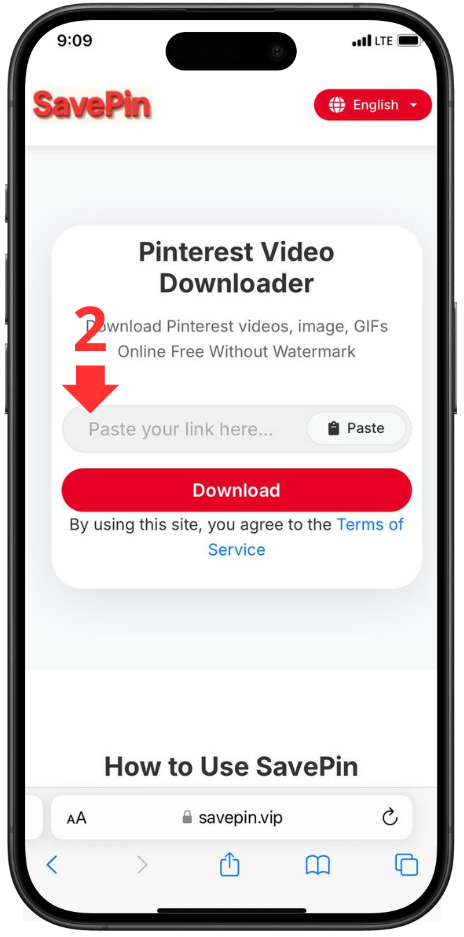
Paste the link
Paste the link into the URL input box on the Pinterest GIF Downloader page.
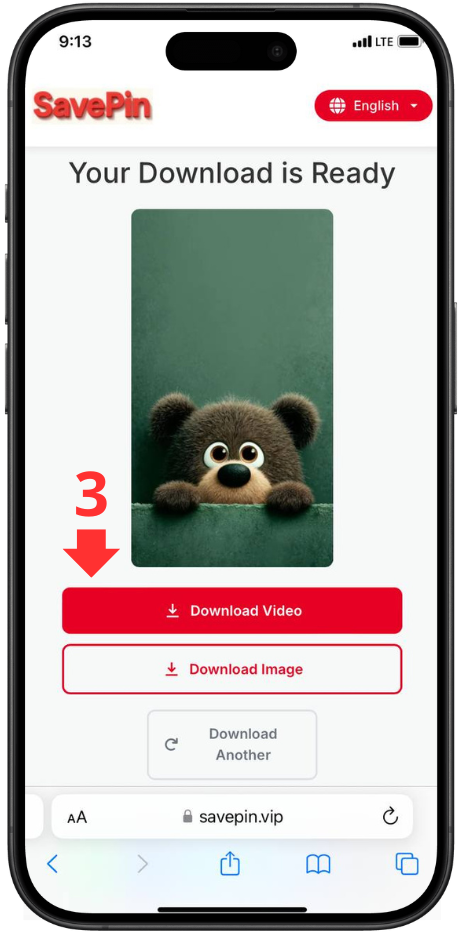
Click Download
Click the “Download” button. The system will automatically process and provide the GIF in original quality.
Pinterest GIF Downloader is a free online tool that helps you download any GIF from Pinterest quickly and easily.
You don’t need to sign up, install any software, or use an app. With just a few simple steps, you can save your favorite GIFs to your device in their original quality.
With Pinterest GIF Downloader, storing GIFs for learning, entertainment, or sharing becomes more convenient than ever.
1. Detailed Guide: How to Download GIFs from Pinterest
Downloading GIFs from Pinterest using the Pinterest GIF Downloader is extremely fast and simple. Just follow these steps:
Step 1: Find the GIF you want to download
-
Go to Pinterest and find the GIF you like.
-
Click the GIF to open it fully.
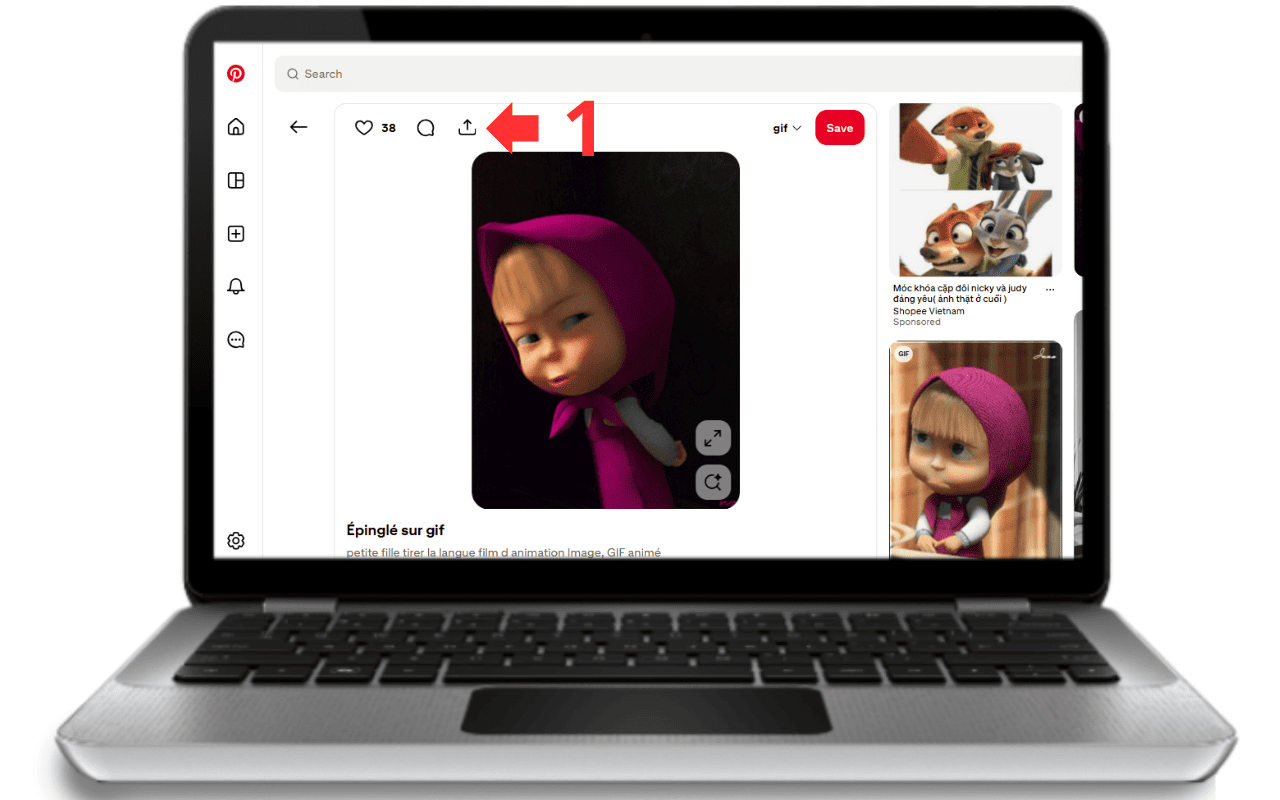
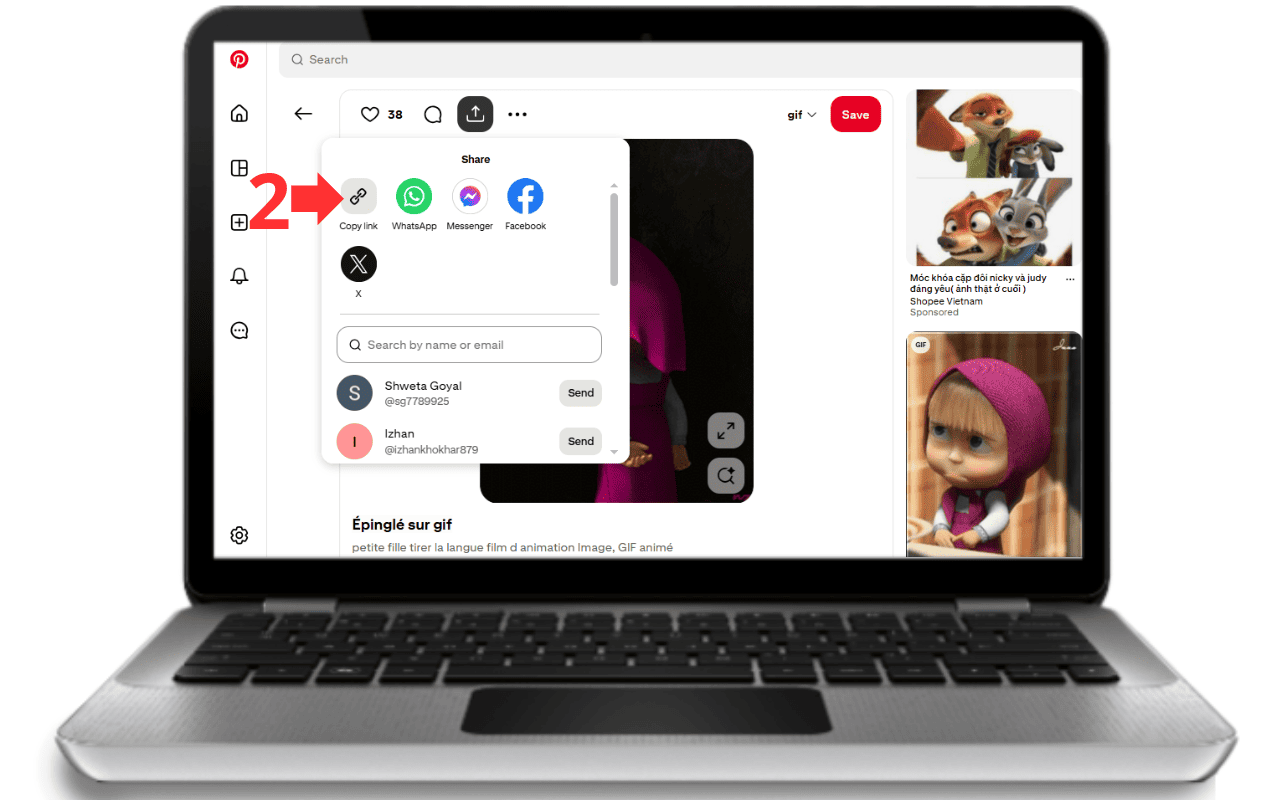
Step 2: Copy the GIF link
-
On the GIF page, click the “Share” icon.
-
Select “Copy Link.”
-
Make sure you copy the correct URL leading to the GIF, not a general Pinterest page.
Step 3: Paste the link into the tool
-
Return to Pinterest GIF Downloader.
-
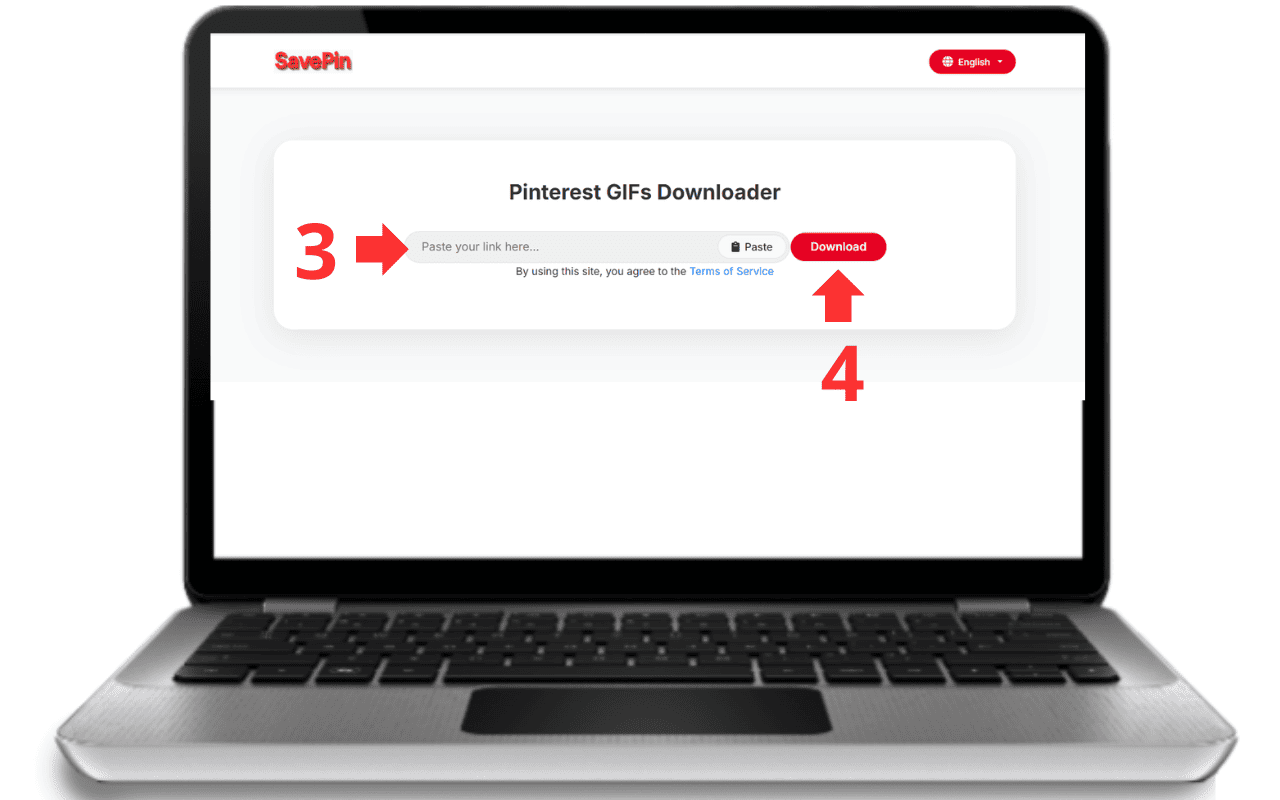
Paste the URL into the box labeled “Paste Pinterest GIF link here.”
Step 4: Start downloading
-
Click the “Download” button.
-
The system will analyze the URL and prepare the GIF in its original quality.
Step 5: Save the GIF to your device
-
Once processing is complete, click “Save” (depending on your browser).
-
Select a folder on your device.
-
The GIF is now ready to view offline, share, or use in your personal projects.
Important Notes:
-
All downloading is handled directly in your browser- no server involved - ensuring maximum privacy and speed.
-
GIFs are downloaded in their original quality, without compression.
-
No Pinterest login or registration required - only the URL.
3. Outstanding Features
1. Download high-quality GIFs
-
Supports downloading all GIF types from Pinterest without quality loss.
-
GIFs retain original size, color, and smooth animation.
2. Supports multiple file formats
-
Download GIFs directly in their original format.
-
No need to convert them to video or static images.
3. Ultra-fast downloading
-
Your favorite GIF is ready within seconds.
-
Optimized system handles multiple links without interruption.
4. Easy to use - One-step process
-
Clean, intuitive interface.
-
Just paste the URL → click Download → done.
5. Completely free
-
Unlimited downloads.
-
No signup or software installation.
-
No annoying ads.
6. Works on all devices & browsers
-
Supports Android, iPhone/iPad, laptops, and desktop computers.
-
Compatible with Chrome, Safari, Firefox, Edge, Opera, and more.
7. Maximum security
-
Does not store user data or links.
-
All processing happens locally in your browser.
-
No tracking or personal data collection.
8. Smart detection technology
-
Automatically analyzes URL content.
-
Displays the correct download option to save time and avoid errors.
4. Benefits of Using Pinterest GIF Downloader
Fast downloads with a single step
Just paste the Pinterest GIF link, and the tool automatically analyzes and downloads it within seconds—no software, no login needed.
Original quality preserved
Downloaded GIFs are never compressed or downgraded, ensuring sharp, smooth, and vibrant animation identical to the original.
100% free
No download limits, no registration, no hidden fees. Download as many GIFs as you want.
Works on any device or browser
Whether you're on Android, iOS, PC, or Mac, and using Chrome, Safari, Firefox, or any browser - the tool works flawlessly.
Maximum privacy
-
No storage of GIFs or URLs.
-
No tracking or data collection.
-
Everything processed locally in your browser.
User-friendly for everyone
Simple interface suitable for all users - students, beginners, seniors, and Pinterest newcomers.
Supports all GIF types on Pinterest
Download traditional, animated, or creative GIFs for personal use, study, or inspiration.
Save time and effort
No complicated software or browser extensions. Just a URL, and your GIF is ready instantly.
5. Compare with other Pinterest GIF downloaders
| Criteria / Tool | Pinterest GIF Downloader (SavePin) | Other GIF Downloader Tools |
|---|---|---|
| Free / No hidden fees | ✔ 100% free, no signup, no paid upgrades | ✘ Some require payment or limit downloads in free mode |
| Simple & Fast – 1 step | ✔ Paste link → Download, very easy to use | ✘ Some require installing plugins, extensions, or multiple complicated steps |
| No installation / No plugins needed | ✔ Works directly on the browser | ✘ Requires installing extensions, software, or apps |
| Download speed | ✔ Processes link & downloads GIF instantly within seconds | ✘ May be slow or require waiting due to server processing |
| Original photo / GIF quality preserved | ✔ GIF keeps original quality – no compression, no downgrade | ✘ Some compress images, resize, or reduce quality |
| Privacy & security | ✔ No image storage, no link storage, no personal data collection | ✘ Some store images/links, track users, or use cookies — less secure |
| Compatible with all devices & browsers | ✔ Supports Android, iOS, PC; Chrome, Firefox, Safari, Edge, etc. | ✘ Some tools only support PC or limited browsers |
| No annoying ads / Clean interface | ✔ Simple, clean UI with no pop-ups | ✘ Many pop-up ads, banners, or require disabling ad blockers |
| Supports GIF + other formats | ✔ Downloads GIFs, images, videos (if supported by tool variants) | ✘ Some tools only support GIF and lack flexibility |
| Clear about copyright & responsibility | ✔ Transparent disclaimer, users understand their usage rights | ✘ Many tools lack clear notices, making users accidentally violate copyright |
Contact Us
If you experience any issues or need assistance, please contact us:
📧 Email: support@savepin.com
🌐 Homepage: SavePin
Our Commitment
Pinterest GIF Downloader is committed to:
-
Being completely free with no hidden fees.
-
Ensuring maximum privacy with no data or GIF storage.
-
Supporting all major devices and browsers.
-
Not encouraging or taking responsibility for downloading copyrighted content.
Frequently Asked Questions
Pinterest GIF Downloader is an online tool that allows you to download GIFs from Pinterest quickly, in original quality, completely free, and without needing to create an account.
No. All features are 100% free, with no download limits, no registration, and no software installation required.
No. The tool works directly in your browser and supports all devices, including Android phones, iPhone/iPad, laptops, and desktop computers.
No. No user data is stored. All GIF downloads are processed directly from Pinterest to your device without passing through any intermediate server.
Common reasons include: invalid or broken link, private GIF, deleted GIF, region-restricted content, or restricted sharing settings. Try another link or a public GIF.
Most GIFs on Pinterest do not have sound. If a GIF includes audio (rare), the tool will download it as a standard GIF file without sound.
Yes. The tool preserves the original quality of the GIF without compression or quality loss.
Yes. It works perfectly on Android, iPhone/iPad and supports all major browsers such as Chrome, Safari, Firefox, Edge, and Opera.
You may download GIFs for personal use. However, using them for commercial or promotional purposes requires permission from the original owner. Please follow Pinterest’s Terms of Service.
No. You can download any GIF from Pinterest without limits on file size or quantity.
No. You only need the URL of the GIF - no login or account required.
Causes may include: the GIF was deleted, restricted by region, or Pinterest blocked the download. Refresh the link or try a different GIF URL.