Pinterest Video Downloader
Download Pinterest videos, image, GIFs Online Free Without Watermark
By using this site, you agree to the Terms of Service
How to Use SavePin
Just follow 3 simple steps:
Copy the Pinterest link
Open Pinterest → choose the video, image, GIF, or Idea Pin → tap “Copy link.”
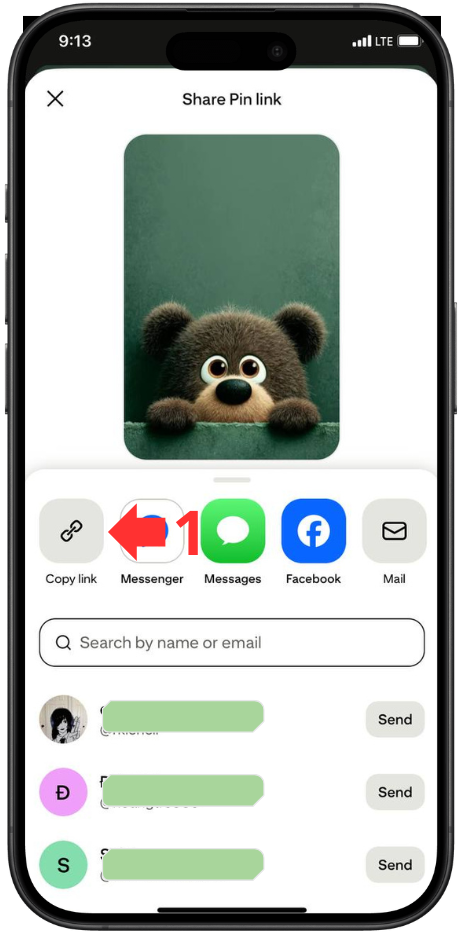
Paste Into SavePin
Go to SavePin → paste the URL into the input box.
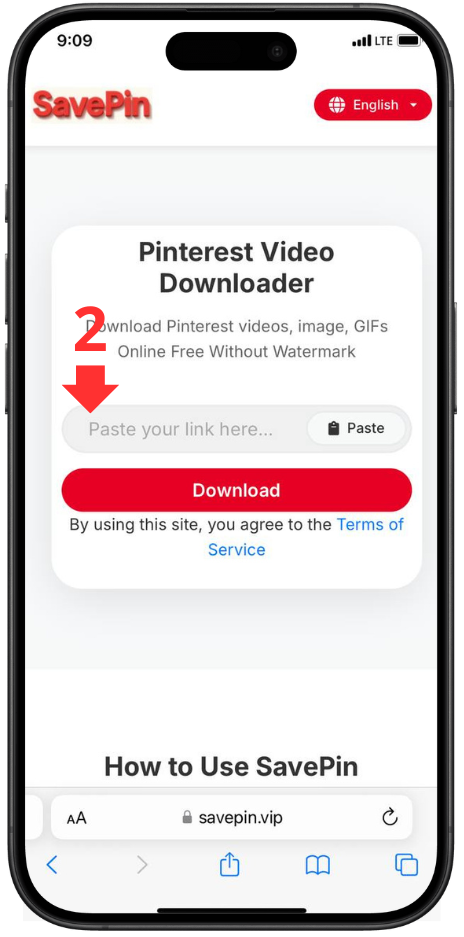
Click “Download”
Choose the format/resolution → the file downloads automatically.
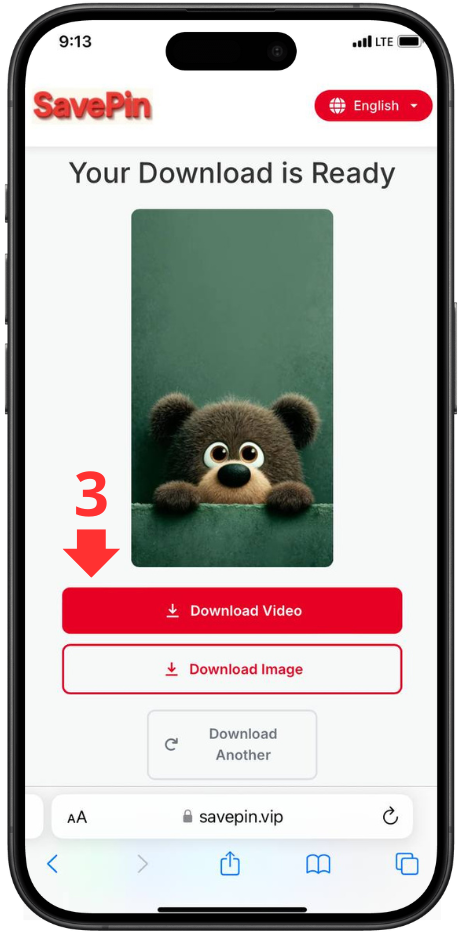
SavePin is an Pinterest video downloader online tool that allows you to download Pinterest videos, images, and GIFs in high quality within seconds. The platform is optimized for all devices - phones, PCs, tablets - and does not require registration or software installation.
1. Why Choose SavePin?
-
Fast & Stable: Download Pinterest videos with just one click.
-
100% Free: No download limits.
-
High Quality: Supports HD and Full HD depending on the original source.
-
Maximum Security: No history stored, no user data collected.
-
Fully Compatible: Works on Chrome, Safari, Android, iOS, desktop devices.
-
Supports All Content Types: Videos, images, GIFs, Idea Pins, Story Pins.
SavePin is designed for a simple, fast, and safe downloading experience for Pinterest users worldwide.
2. Key Features of SavePin
1. Download High-Quality Pinterest Videos
SavePin allows you to download all types of Pinterest videos, including short videos, long videos, Idea Pins, and tutorial videos.
The system automatically analyzes the link and provides available quality options:
-
HD (720p)
-
Full HD (1080p)
-
Original quality (if Pinterest supports it)
Advantages:
-
No watermark
-
No quality loss
-
Download in seconds
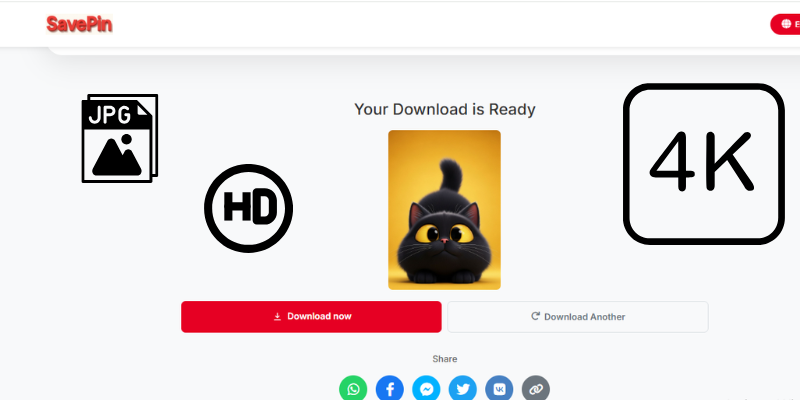
2. Download Pinterest Images Without Quality Loss
Pinterest often compresses images, but SavePin lets you download them in full resolution - perfect for:
-
Graphic design
-
Printing
-
Collecting
-
Creative inspiration
Supports all major image formats: JPG, PNG, WEBP…
3. Download GIFs From Pinterest
GIFs are popular on Pinterest but difficult to save.
SavePin lets you download GIFs while:
-
Keeping original animation
-
Keeping original size
-
Not converting them to video or static image (like many tools do)
4. No Login – No Installation
SavePin works directly in the browser:
-
No account needed
-
No app needed
-
No plugins or extensions
Just paste the URL and download.
5. Ultra-Fast Download Speed
SavePin’s optimized servers ensure:
-
Fast link processing
-
Fast video rendering
-
File downloads in 1–3 seconds
Ideal for users who download large quantities.
6. Full Device & Browser Compatibility
SavePin is fully compatible with:
Devices:
-
Android phones
-
iPhone / iPad
-
Laptops / PCs
-
Tablets
Browsers:
-
Chrome
-
Safari
-
Firefox
-
Edge
-
Opera
Works regardless of operating system.
7. Unlimited Downloads
Users can download:
-
100+ videos/day
-
500+ images/week
No file size limits.
No premium tiers.
No hidden restrictions.
8. Maximum Security – No Data Stored
SavePin guarantees:
-
No Pinterest links saved
-
No media saved on servers
-
No user tracking
-
No personal data collection
-
No tracking cookies
All processing happens directly through your browser.
9. User-Friendly Interface
Clean, simple, intuitive interface ideal for:
-
Seniors
-
Students
-
New Pinterest users
-
Users who download frequently
Just 1 step: Paste the link → Download.
10. Supports Multiple File Formats
Depending on the Pinterest content, SavePin allows downloading:
-
MP4 (videos)
-
JPG / PNG / WEBP (images)
-
GIF
11. Automatic Pinterest Content Detection
When you paste a link, SavePin automatically:
-
Detects whether it is a video, image, or GIF
-
Distinguishes media types
-
Shows the correct download options
Helps save time and avoid confusion.
3. Disclaimer
SavePin is a download-support tool and does not store videos or images on its servers.
All content belongs to the original creator.
Users are responsible for:
-
Downloading copyrighted content
-
Using content for commercial purposes
-
Violating Pinterest’s terms of service
SavePin is not responsible for improper usage of downloaded content.
4. SavePin vs. Other Pinterest Downloaders
| Criteria | SavePin | Other Tools |
|---|---|---|
| Download Speed | ⚡ Fast & stable | Average |
| File Quality | HD / Full HD | Often reduced |
| Supported Formats | Video, Image, GIF, Idea Pin | Limited |
| Security | No data stored | Ads, trackers, malware risks |
| Cost | 100% free | Some require VIP |
| Ads | Clean, no intrusive ads | Many pop-ups |
Conclusion
SavePin stands out for its speed, clean interface, high security, and feature-rich experience.
It is Pinterest downloader for users who want to save videos, images, or GIFs quickly and safely.
If you're looking for a tool to download Pinterest videos, images, and GIFs - SavePin is the perfect choice.
Frequently Asked Questions
SavePin is an online tool for downloading Pinterest videos, images, and GIFs quickly and for free without registration.
Yes. All features are 100% free with no limits.
No. SavePin works entirely in your browser.
No. SavePin does not store or track any user data.
All downloads occur directly between Pinterest and your device.
Common reasons:
-
Invalid or broken link
-
Content is private
-
Video deleted or region-restricted
-
Sharer disabled video sharing
Try another link or use public content.
Yes, if the original Pinterest video includes audio.
Yes. SavePin supports full-resolution image downloads.
Yes. SavePin works perfectly on:
-
Android
-
iPhone/iPad
-
Desktop
Compatible with all browsers.
Yes, for personal use only.
Do not reuse content commercially without permission.
No. Download size depends only on the original Pinterest file.
Yes. You can download animated GIFs directly.
No. Only the URL is required.
Possible reasons:
-
Video deleted
-
Country restrictions
-
Pinterest blocked downloads
Try refreshing the link or using a different one.